
Download Nightbot – Free Twitch Chat Bot & YouTube Live Moderator
Overview
Nightbot is a cloud‑based chat moderation and automation tool created by NightDev, LLC, designed specifically for Twitch and YouTube live streamers. In the fast‑paced world of live streaming, keeping the chat clean, engaging, and on‑brand can feel like a full‑time job. Nightbot solves that problem by acting as a virtual moderator that filters spam, posts scheduled messages, and responds to custom commands—all without requiring any local installation.
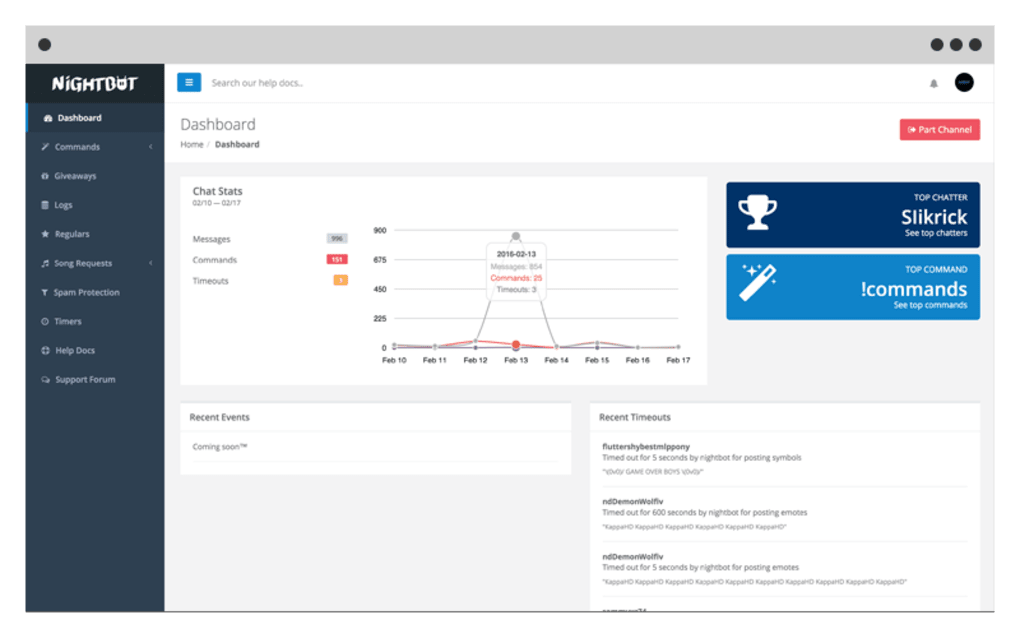
Because it runs entirely in the browser, the bot works on any device that can access the web, making it a truly cross‑platform solution for creators who stream from Windows, macOS, Android, or iOS devices. Its intuitive dashboard gives streamers a real‑time view of incoming messages, fan activity, and command usage, while a searchable chat log preserves every line of conversation, even those that have been automatically removed. Whether you are a hobbyist streamer looking for a free, secure way to keep your chat tidy, or a professional broadcaster needing advanced automation, Nightbot offers a flexible set of features that can be tailored to any channel’s personality and moderation policy.
The tool is constantly updated by the NightDev team, ensuring compatibility with the latest Twitch and YouTube API changes, and it integrates seamlessly with popular streaming software such as OBS and Streamlabs. In short, Nightbot is the go‑to chat assistant that lets you focus on content creation while it handles the repetitive tasks that keep your community healthy and engaged.
Key Features & How to Get Started
Feature List
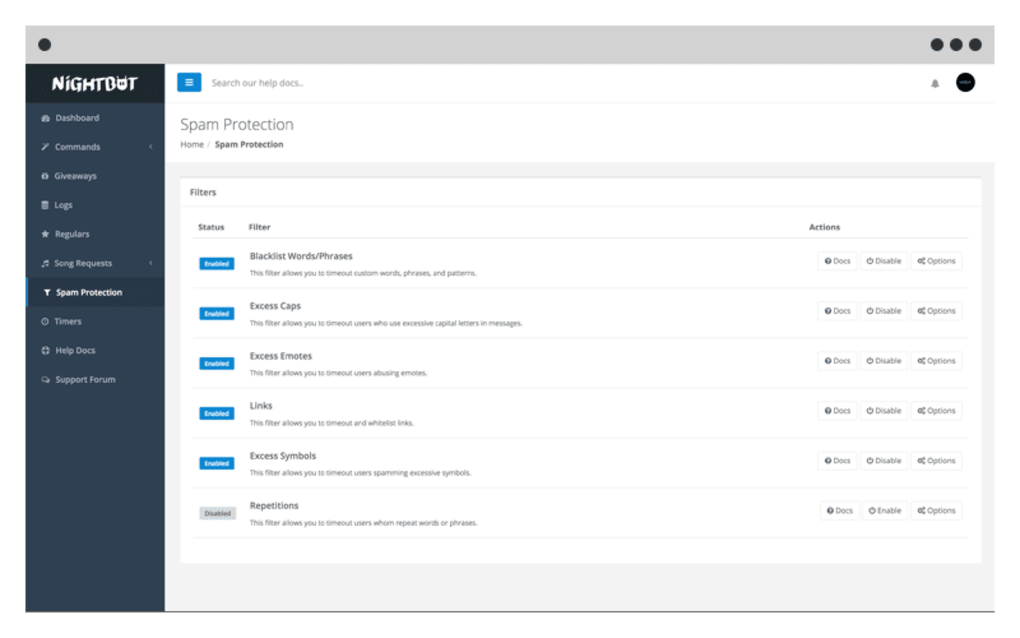
- Automatic spam filtering (links, caps, symbols, repeated messages)
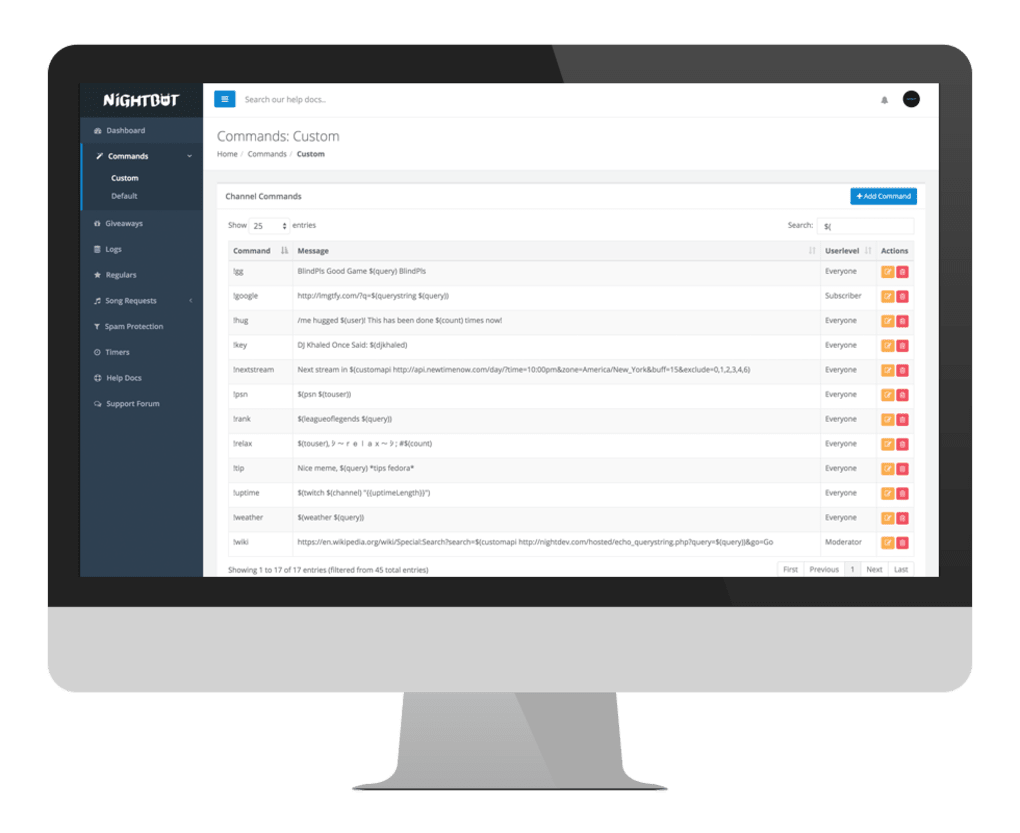
- Custom command creation – respond with text, URLs, or even API calls
- Song request integration for YouTube and Spotify playlists
- Timed announcements – schedule promotions, giveaways, or reminders
- Chat log archive – view, search, and export every message, including deleted ones
- Multi‑channel support – manage several Twitch or YouTube channels from one account
- Permission tiers – assign moderator, VIP, or subscriber roles to specific commands
- Integration with Streamlabs, OBS, and Discord for cross‑platform alerts
- Free tier with unlimited commands and basic moderation
- Premium subscription for advanced analytics, custom branding, and priority support
Installation & Usage Instructions
Getting Nightbot up and running is a straightforward process that can be completed in under ten minutes:
- Create an account: Visit nightbot.tv and sign in using your Twitch or YouTube credentials. The OAuth flow securely links Nightbot to your channel without exposing your password.
- Authorize the bot: After signing in, click “Join Channel.” Nightbot will join your chat as a moderator automatically, giving it permission to delete messages and post announcements.
- Configure basic settings: In the dashboard, toggle spam filters, set the language, and enable the “Song Request” feature if desired. You can also customize the command prefix (default is “!”) to avoid conflicts with other bots.
- Add custom commands: Navigate to the “Commands” tab, click “Add Command,” and fill in the trigger (e.g., !rules) and response (e.g., a link to your channel guidelines). Use variables like $(user) to personalize replies.
- Schedule timed messages: Under “Timers,” define the message content, interval, and any required user level. This is perfect for reminding viewers about Discord links, merch stores, or upcoming streams.
- Monitor activity: The “Live Feed” view shows real‑time chat activity, while the “Chat Logs” tab lets you review historic messages, filter by user, or export data for moderation analysis.
Because Nightbot runs in the cloud, there is no software to download or install on your computer. All changes you make are saved automatically and take effect instantly across all devices logged into your streaming platform.
Compatibility, Pros & Cons, and Frequently Asked Questions
Operating System Compatibility
Nightbot is a web‑based application, which means it works on any operating system that can run a modern browser. Whether you stream from Windows 10/11, macOS Ventura, Linux, Android, or iOS, you can access the Nightbot dashboard, edit commands, and monitor chat logs without any additional software. The bot itself operates on NightDev’s servers, so your local machine’s performance does not affect its reliability.
Pros and Cons
Pros:
- Completely free core features; premium tier optional.
- Zero‑install, cloud‑based solution works on all devices.
- Powerful spam filters keep chat clean without constant manual oversight.
- Custom commands and timers allow extensive automation.
- Integrated song request system supports YouTube and Spotify.
- Real‑time dashboard and searchable chat logs improve moderation efficiency.
- Regular updates ensure compatibility with Twitch and YouTube API changes.
Cons:
- Limited visual customization for bot responses (no rich embeds on Twitch).
- Premium features (advanced analytics, custom branding) require a subscription.
- Complex command logic may require learning Nightbot’s variable syntax.
- Occasional latency in timed messages during high‑traffic streams.
- No native mobile app; management is done through a browser on mobile devices.
FAQ – Nightbot
Is Nightbot really free to use?
Yes. All core moderation and automation features are completely free. A paid “Premium” tier is optional and provides extra analytics, custom branding, and priority support.
Can Nightbot moderate both Twitch and YouTube chats simultaneously?
Absolutely. You can link multiple Twitch and YouTube channels to a single Nightbot account, allowing you to manage all chats from one unified dashboard.
How does Nightbot handle spam filters?
Nightbot uses a combination of keyword detection, regex patterns, and rate‑limiting to automatically delete messages that contain excessive caps, symbols, links, or repeated content. Settings are adjustable per channel.
Do I need to keep Nightbot as a moderator on my channel?
Yes. Nightbot must have moderator privileges to delete messages and post timed announcements. Adding it as a moderator is a one‑time step during the initial setup.
Can I export my chat logs for offline analysis?
The dashboard includes an “Export” button in the Chat Logs section, allowing you to download logs in CSV format for further analysis or record‑keeping.
Conclusion – Why Nightbot Is the Smart Choice for Streamers
In the competitive landscape of live streaming, maintaining an engaging and well‑moderated chat is essential for audience retention and brand reputation. Nightbot delivers a robust, cloud‑based solution that balances simplicity with powerful automation. Its free tier already covers the majority of moderation needs, while the premium upgrade offers analytics and branding options for channels looking to scale.
Because it runs entirely in the browser, there are no compatibility worries—whether you stream from a Windows PC, a Mac laptop, or a mobile device, Nightbot is ready to assist. The real‑time dashboard, searchable chat logs, and extensive command system empower creators to focus on content rather than repetitive chat management. If you’re seeking a secure, constantly updated tool that integrates seamlessly with Twitch, YouTube, OBS, and Streamlabs, Nightbot stands out as the most reliable choice on the market today.
Ready to give your community a cleaner, more interactive chat experience? Download Nightbot now, configure your first command in minutes, and watch the difference as your chat becomes a welcoming space for fans and new viewers alike. Join the millions of streamers who trust Nightbot to keep their chat safe, fun, and fully automated.



.png)



